Converting IMF to Flat Using Jobs
To convert an IMF feature to a flat deliverable package:
- From the Transcoder Providers menu,
configure a transcoder provider that can handle IMF to Flat conversion.
See About Transcoder Providers.
- From the Platforms menu, on the Transcoder Profile section, configure a transcoder
profile to use the previously defined transcoder provider. See About Transcoder Profile
Details.
- From the Package Templates menu, create
a new package template with Package Type
set to IMF. See Creating
a Package Template.
From the Deliverables section, click Add Deliverable Template.
Take the following into consideration:
- From the Jobs menu, click New
Job. The Create New Job page is
displayed.
The Create New Job Page
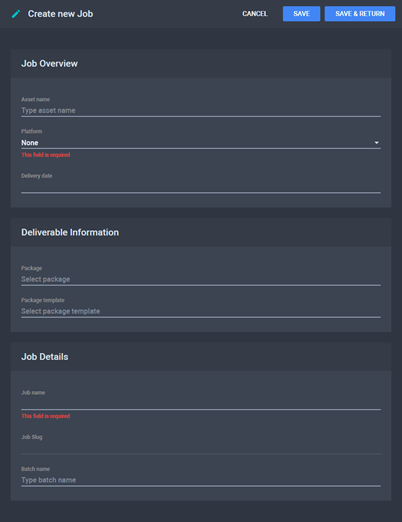
- On the Job Overview section, choose
the asset that contains your IMF composition, select the Platform
defined at step 2, and pick a Delivery Date
for your flat package.
- On the Deliverable Information section,
choose the Package Template defined at
step 3.
- On the Job Details section, choose
a Job Name and a Batch
Name (if the current job is part of a Batch).
- Click Save. The Job
is processed and its details are displayed in the Job
Analysis section.
- If the job was processed successfully, click Start
to begin IMF to flat conversion.
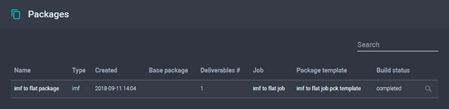
- Once the conversion process has ended, you can see the resulting
package in the Packages section.
Result in Packages Section
See
Also